
2026 AI Video Summary Guide: Use BibiGPT to Summarize Audio & Video in One Click
Learn how to build a modern AI video summary workflow with BibiGPT in 2026—from one-click summaries to article mode, visual analysis, subtitle translation, and conversational tracing—to turn long videos and podcasts into actionable knowledge.
2026 AI Video Summary Guide: Use BibiGPT to Summarize Audio & Video in One Click
Last Updated: March 2026
Table of Contents
- Why AI Video Summaries Still Matter in 2026
- What Is AI Video Summary? It’s More Than Transcripts
- Meet BibiGPT: Your AI Audio & Video Learning Assistant
- BibiGPT’s AI Video Summary Capabilities: 2026 Feature Overview
- One-Click Summaries for Long Videos & Audio
- AI Video to Article: Turn Recordings into Publish-Ready Posts
- AI Video Chat & Source Tracing: Ask Questions, Jump to the Moment
- Mind Maps & Visual Summaries: See Complex Topics at a Glance
- Visual Analysis: Understand What’s On Screen (2026 New)
- Subtitle Translation & Burn-in: Multilingual Accessibility (2026 New)
- Notes & Knowledge Management: From “I Watched It” to “I Can Use It”
- A 3-Step Workflow to Learn Faster with AI Video Summaries
- FAQ: Common Questions About AI Video Summaries
- Try BibiGPT Today as Your AI Video Summary Assistant
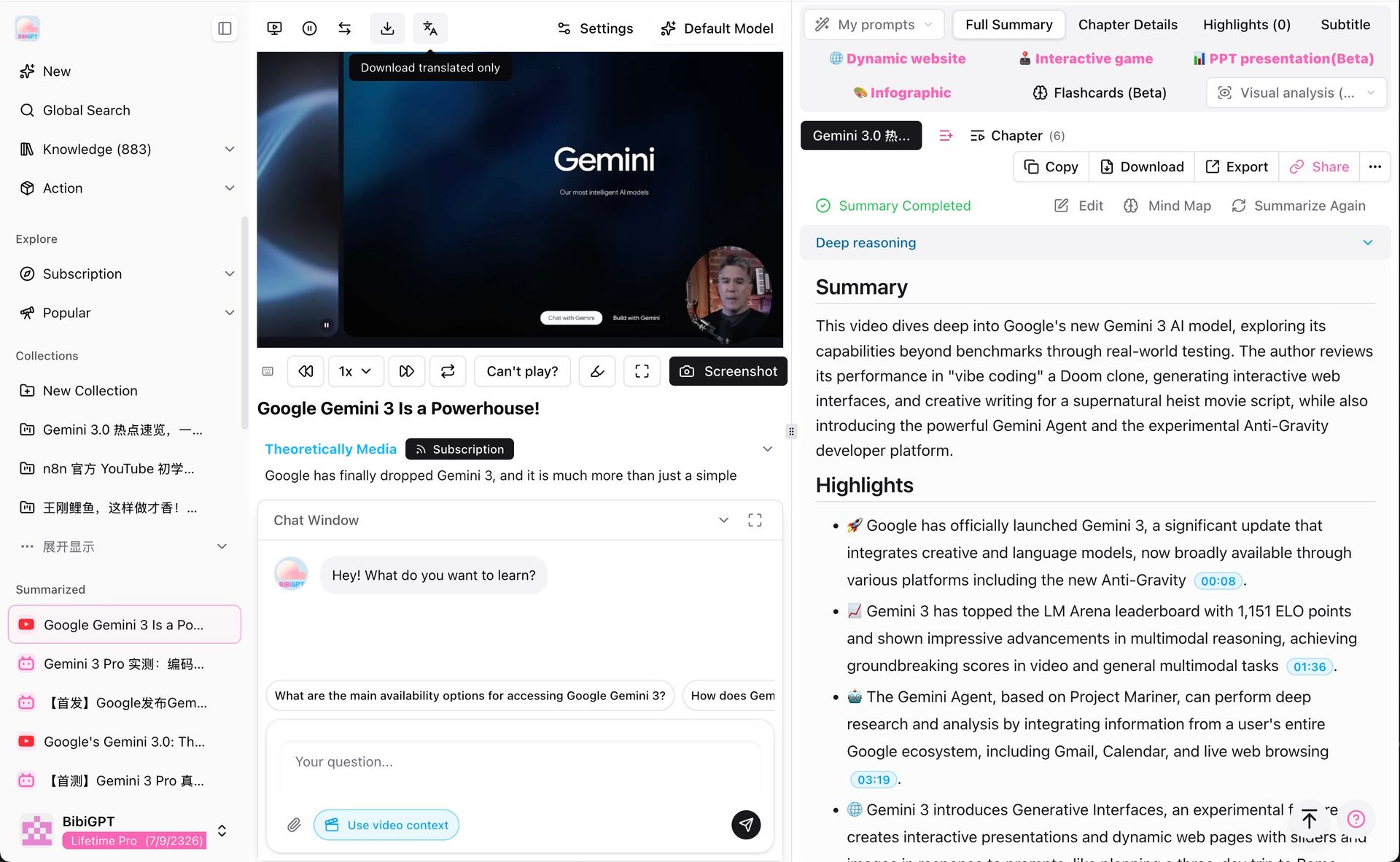 BibiGPT AI video summary detail page 2025
Why AI Video Summaries Still Matter in 2026
Shorts are everywhere, but long-form content is exploding too: multi-hour courses, livestream replays, podcasts, interviews, tech talks, and keynotes. The problem is simple: your time hasn’t grown, but the content queue has.
Chances are you’ve experienced at least one of these:
- You bookmark dozens of long videos and rarely finish any of them.
- You vaguely remember “this video explained it well” but can’t find the exact segment.
- You feel busy “watching” but don’t end up with reusable knowledge.
AI video summaries are designed to flip this equation:
- Spend a few minutes getting the big picture.
- Decide where to go deep.
- Turn raw footage into structured, searchable, and reusable insights.
Research in cognitive science shows that active recall can raise long-term memory retention to 80% (Cognitive Psychology, 2024). BibiGPT's AI video summary is the tool that transforms passive watching into active learning.
What Is AI Video Summary? It’s More Than Transcripts
Many tools still stop at “speech-to-text + a short abstract.” That helps, but it doesn’t solve the real learning problem.
A modern AI video summary system should:
- Understand structure – recognise whether it’s a course, keynote, interview, or tutorial and identify sections, transitions, and key arguments.
- Adapt to different needs – sometimes you want bullet points, sometimes a full article, sometimes a mind map or flashcards.
- Stay connected to the source – allow you to ask questions and jump back to the original segment that supports each answer.
This is the direction BibiGPT has doubled down on in 2026: moving from a basic “AI video summarizer” to a full AI audio & video learning assistant.
Meet BibiGPT: Your AI Audio & Video Learning Assistant
BibiGPT is designed to help you watch faster, search better, and use knowledge more effectively across audio and video.
With BibiGPT, you can:
- Support 30+ platforms – including Bilibili, YouTube, Douyin, TikTok, podcast sources, and local files — see AI video summary features;
- Generate high-quality summaries – subtitles, key takeaways, outlines, and structured notes in one place;
- Understand visuals as well as speech – visual analysis of on-screen content including slides, charts, and whiteboards (2026 upgrade);
- Work across languages – Chinese, English, Japanese, and Korean content processing and output;
- Output in multiple formats – summaries, outlines, article view, mind maps, flashcards, PPT presentations, and more.
Instead of being “yet another summarizer,” BibiGPT becomes a central hub between your media inputs and your knowledge systems. Trusted by over 1 million users, with more than 5 million AI summaries generated as of March 2026.
BibiGPT’s AI Video Summary Capabilities: 2026 Feature Overview
One-Click Summaries for Long Videos & Audio
The core workflow in BibiGPT is intentionally simple:
- Open
https://bibigpt.co - Paste a video / podcast link or upload a local file
- Click to generate a summary
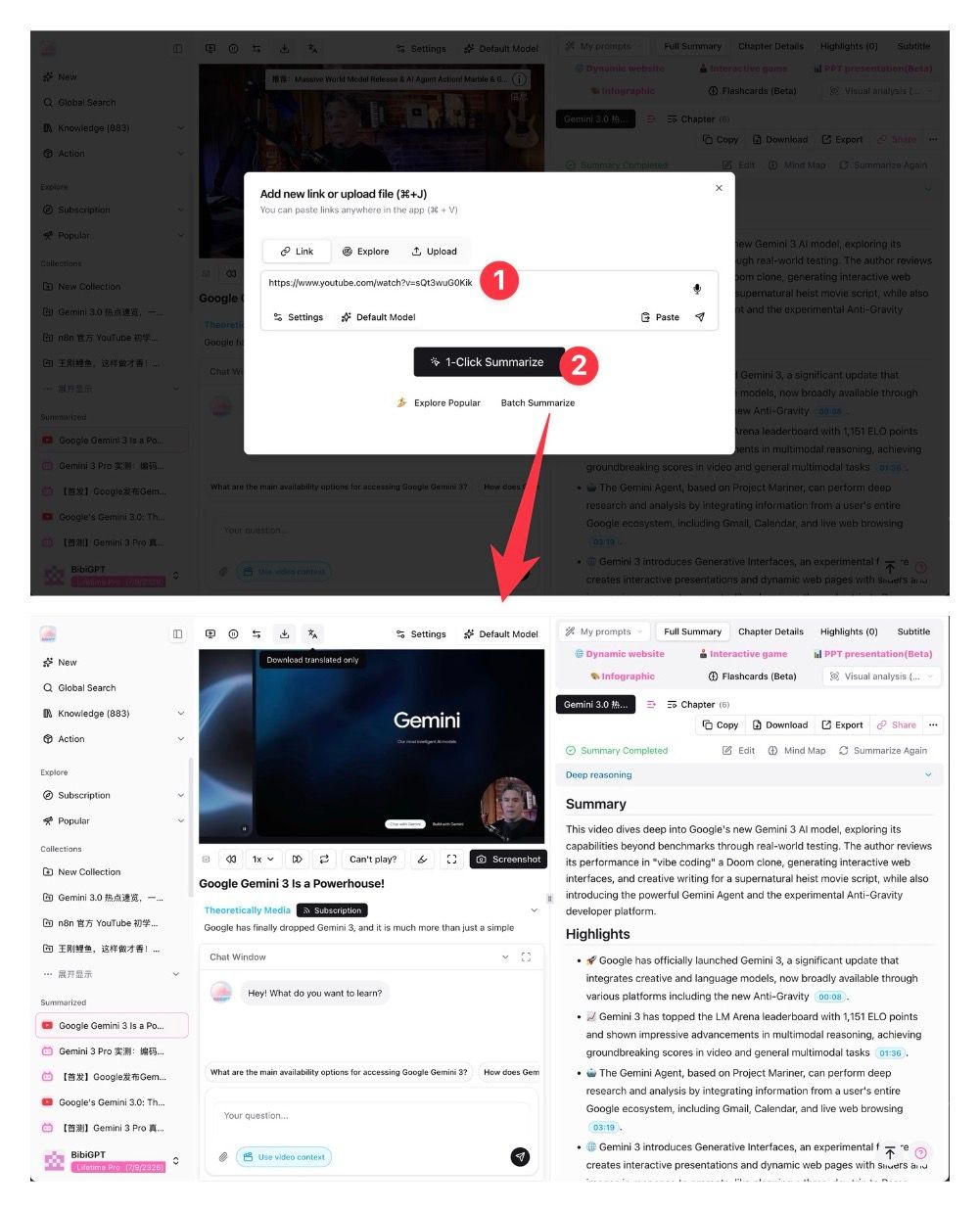 BibiGPT AI video summary 3-step workflow 2025
In return, you get:
- A global overview – what this content is about, who it’s for, and why it matters.
- Key points by section – broken down into digestible chunks with headings and bullets.
- Timestamps where needed – so you can jump directly back into the recording.
- Configurable depth – skim-level summaries for quick scanning or deeper outlines when you want to study.
Whether it’s a 2-hour lecture, a 60-minute podcast, or a 30-minute tech talk, BibiGPT helps you preview before committing your full attention.
AI Video to Article: Turn Recordings into Publish-Ready Posts
If you create content, a raw summary is just step one—you often need a full article you can publish or repurpose.
That’s where BibiGPT’s AI Video to Article feature comes in:
- A dedicated entry at
bibigpt.co/article(or switch to article mode from a summary view). - Automatic detection of structure with titles, introductions, subsections, and transitions.
- Smart use of keyframes as inline images to create a rich reading experience.
- Export options to HTML, PDF, and Markdown, ready for blogs, newsletters, documentation, and knowledge bases.
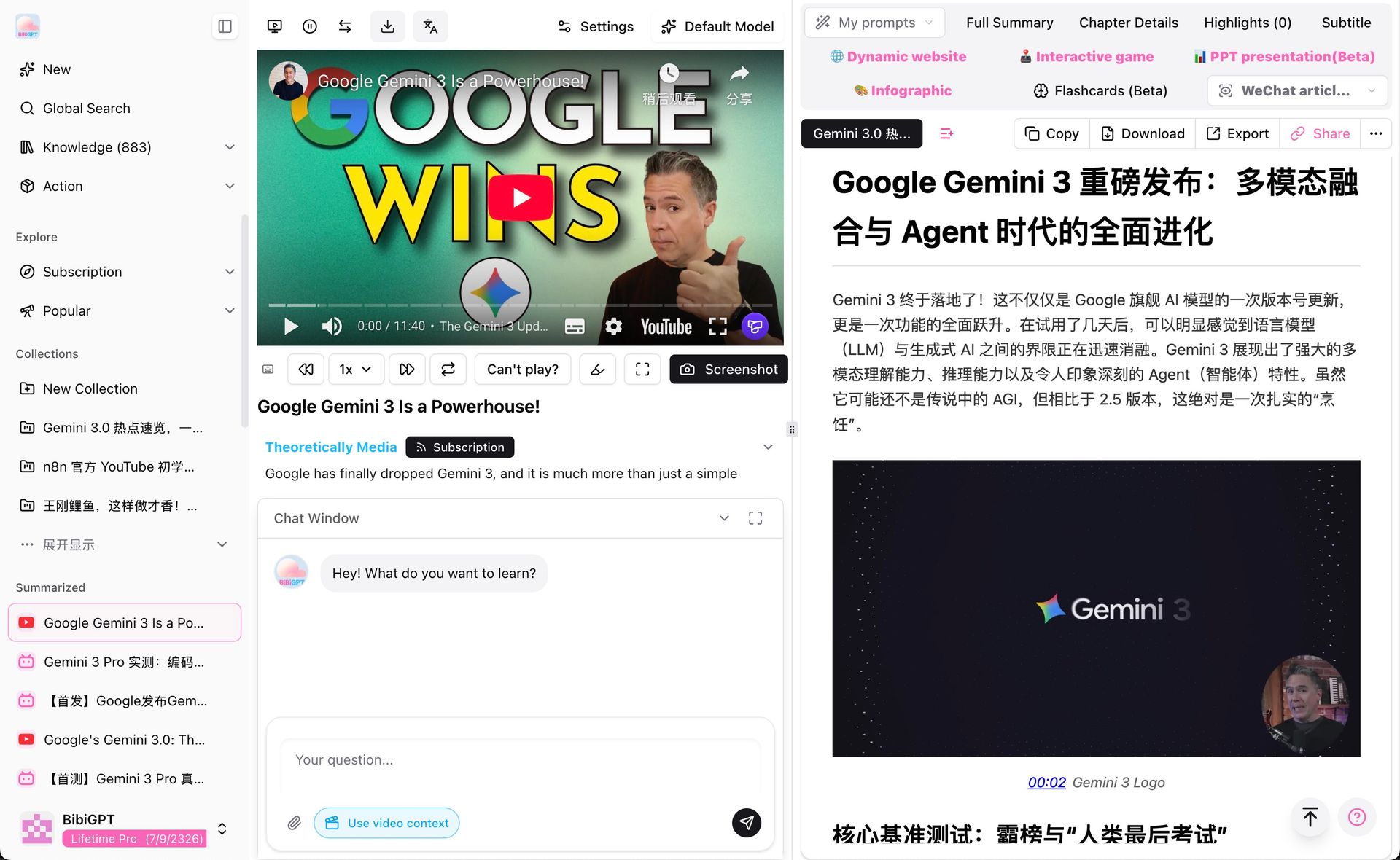 BibiGPT AI video to article page 2025
For creators, this means:
- One video can power multiple articles across platforms.
- You spend less time on manual transcription, screenshotting, and formatting.
- You can focus your energy on editing, curating, and adding your unique voice.
AI Video Chat & Source Tracing: Ask Questions, Jump to the Moment
Long-form content becomes truly powerful when you can interact with it on your own terms.
With BibiGPT’s upgraded chat window, you can:
- Ask natural questions like:
- “How did the speaker define this concept?”
- “What are the three main recommendations from this session?”
- “Was there anything related to time management?”
- Receive answers that include clickable timestamps;
- Hover to preview the referenced moment;
- Click to jump straight to the video segment in context.
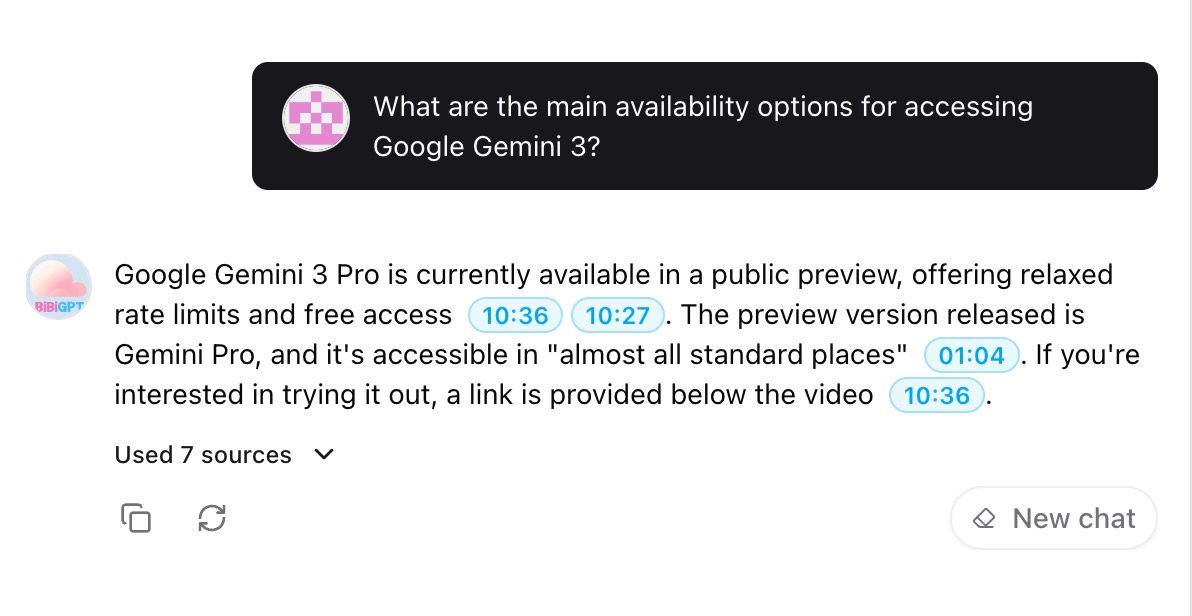 BibiGPT AI video chat window with timestamp jumping 2025
This keeps AI answers:
- Grounded in the original content, not hallucinations;
- Easy to verify, especially for critical or technical topics;
- Ideal for courses, interviews, meetings, and any content you might revisit over time.
Mind Maps & Visual Summaries: See Complex Topics at a Glance
Some topics are simply too dense to live only in paragraphs. Frameworks, multi-step processes, multi-chapter courses—all benefit from a visual layer.
BibiGPT supports:
- Mind maps – hierarchical breakdowns of lectures and talks into nodes, branches, and relationships;
- Concept maps or visual cards – compact visual representations of key ideas;
- Interactive views – structured pages that turn long recordings into explorable, clickable knowledge spaces.
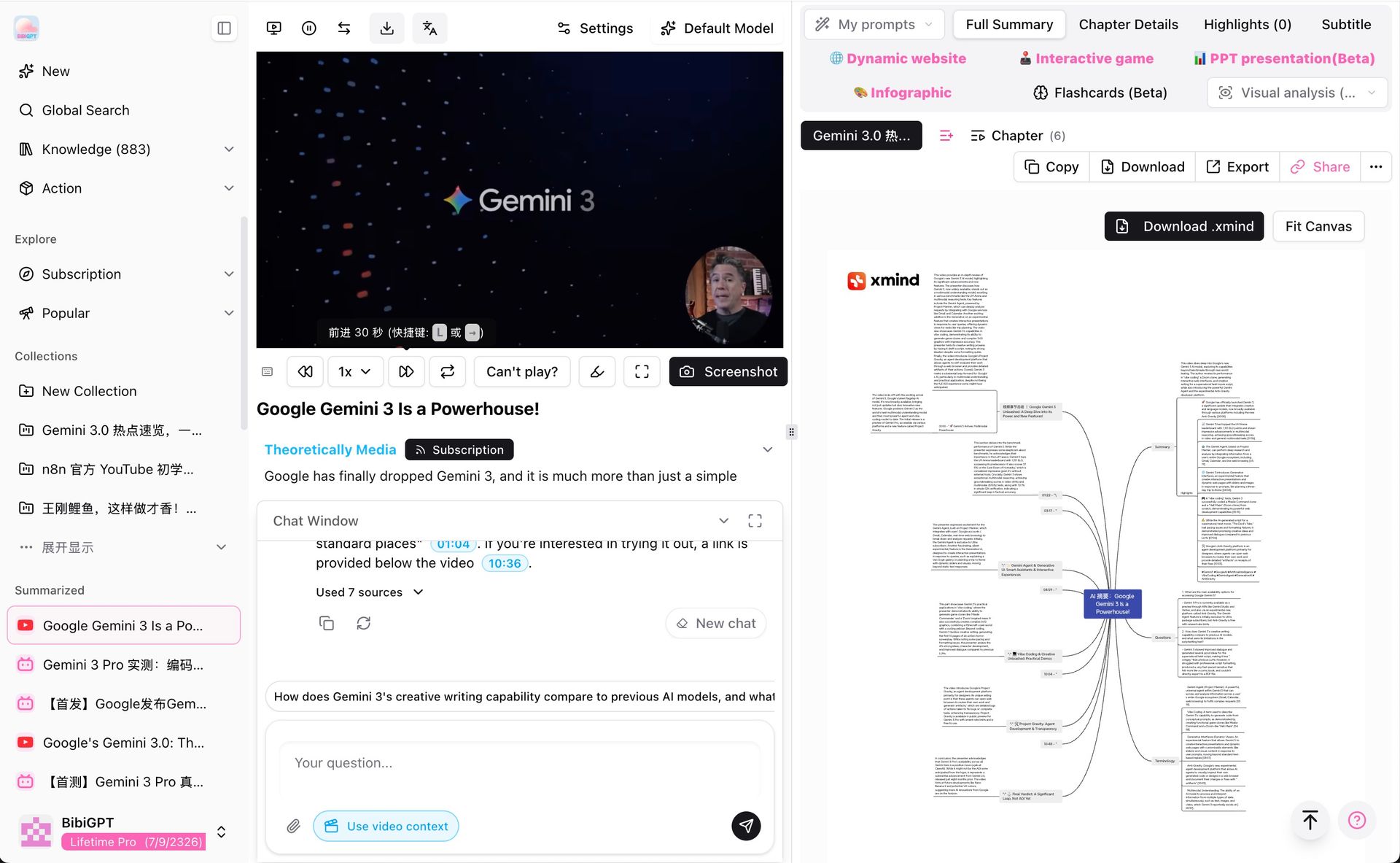 BibiGPT AI video mindmap visual summary 2025
Visual summaries are especially helpful if you:
- Build systematic understanding for exams, certifications, or long-term projects;
- Teach or present to teams and need a clear high-level outline;
- Turn videos into curricula, workshop materials, or reusable learning assets.
Visual Analysis: Understand What's On Screen (2026 New)
This is BibiGPT's major 2026 upgrade: not just hearing the audio, but seeing and understanding the visual content.
BibiGPT's visual analysis (visual content analysis) can:
- Understand charts, PPT slides, whiteboard explanations shown in the video;
- Analyze products, people, and scenes appearing on screen;
- Merge on-screen visual information with audio content for more accurate comprehensive summaries;
- Generate social media images for content creators — Xiaohongshu covers, public account illustrations, and more.
This is especially valuable for technical demo videos (heavy code and diagrams), product launches (on-screen demo understanding), and lectures (whiteboard explanations). Learn more: AI video summary with visual content analysis.
Subtitle Translation & Burn-in: Multilingual Accessibility (2026 New)
As of 2026, BibiGPT adds subtitle translation and burn-in capabilities:
- Automatic subtitle translation: translate the video's original subtitle track into your target language (e.g., English video → Chinese subtitles);
- Subtitle burn-in: embed translated subtitles directly into the video file, producing a bilingual-subtitle version;
- Multilingual output: Chinese, English, Japanese, Korean, and more.
For cross-language learners and creators producing multilingual content versions, this is an indispensable capability. Combine with the YouTube subtitle downloader to build a complete multilingual content workflow.
Notes & Knowledge Management: From “I Watched It” to “I Can Use It”
The real value of an AI video summary appears weeks or months later, when you need to revisit or reuse what you’ve learned.
That’s why BibiGPT is built to work hand-in-hand with your note-taking tools:
- Sync summaries and highlights to tools such as Notion, Obsidian, and Readwise;
- Preserve timestamps and links so you can always trace back to the original clip;
- Turn insights into flashcards to support spaced repetition and deep learning.
Over time, this creates a simple division of labor:
- BibiGPT helps you extract and structure knowledge from media.
- Your note system helps you store, search, and connect that knowledge.
- You focus on thinking, deciding, and applying what matters.
See BibiGPT's AI Summary in Action
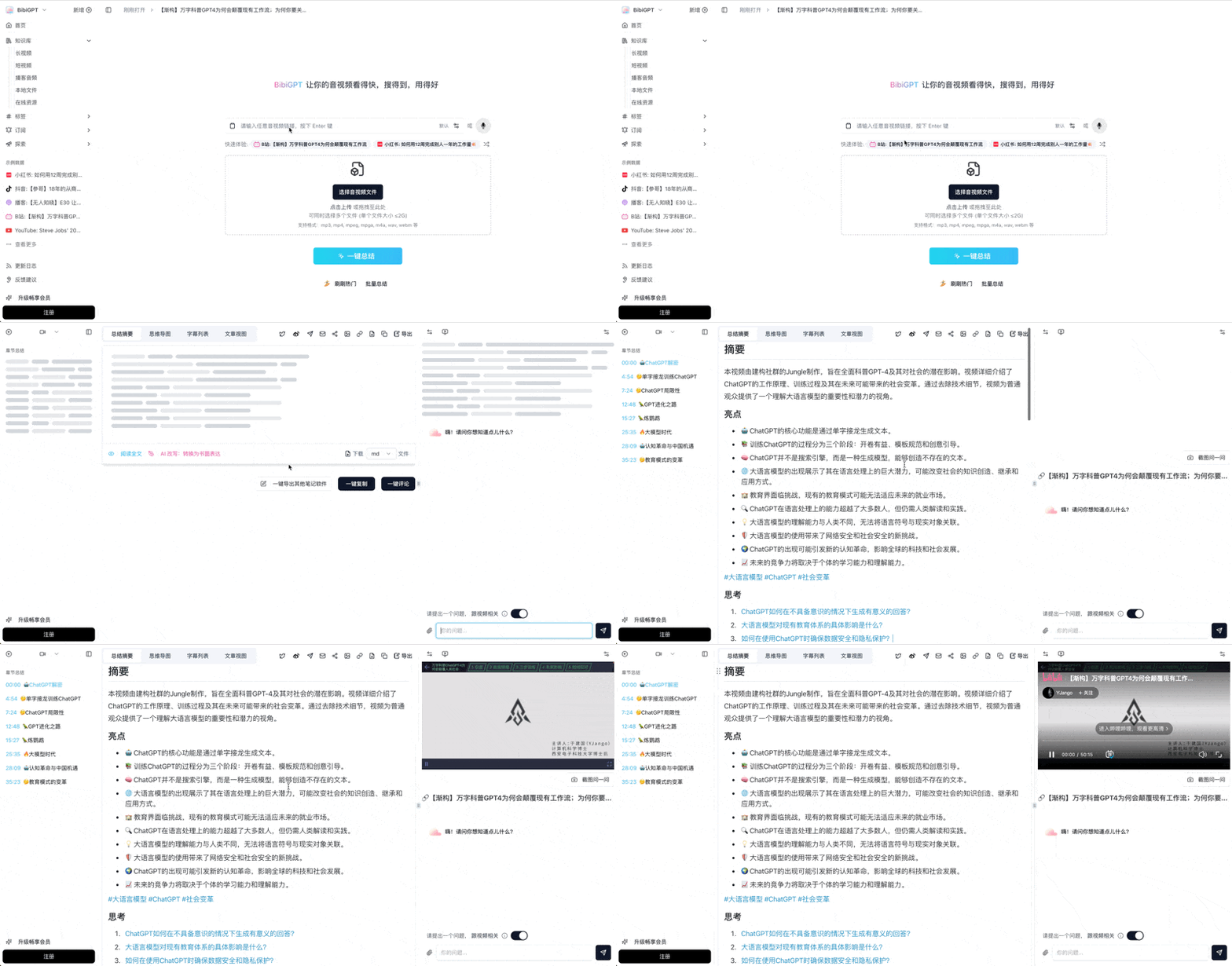
Bilibili: GPT-4 & Workflow Revolution
A deep-dive explainer on how GPT-4 transforms work, covering model internals, training stages, and the societal shift ahead.
Want to summarize your own videos?
BibiGPT supports YouTube, Bilibili, TikTok and 30+ platforms with one-click AI summaries
Try BibiGPT FreeA 3-Step Workflow to Learn Faster with AI Video Summaries
If you’re new to BibiGPT, here’s a lightweight workflow you can adopt immediately.
Try pasting your video link
Supports YouTube, Bilibili, TikTok, Xiaohongshu and 30+ platforms
Step 1: Pick One Piece of Content That Truly Matters
Start with something that’s been sitting on your “I should really watch this” list:
- A course series on Bilibili or YouTube;
- A dense podcast interview with an expert;
- A replay of an internal training or public webinar;
- A long-form talk you’ve wanted to internalise properly.
Step 2: Run It Through BibiGPT Once
- Visit
https://bibigpt.co - Paste the link or upload the file
- Choose a suitable mode (quick or in-depth summary)
- Let BibiGPT generate a structured view
From there, you can:
- Switch to article mode for a narrative recap;
- View mind maps or visual overviews if available;
- Use chat + timestamps to dig into specific questions.
This alone transforms a 60–120 minute video into a 3–10 minute orientation session.
Step 3: Save It Somewhere Your Future Self Will Look
Don’t let insights live only in a browser tab. Instead:
- Push key notes into your knowledge base (Notion, Obsidian, or similar);
- Turn crucial points into flashcards for long-term memory;
- Link summaries to active projects, docs, or planning boards.
You can also reflect briefly:
- What was the core question or theme of this video?
- Which 3–5 points actually matter to you right now?
- What one action will you take based on this content?
This turns AI video summaries from a convenience feature into a consistent learning habit.
FAQ: Common Questions About AI Video Summaries
1. Are AI video summaries accurate enough to trust?
No AI system is perfect, which is why BibiGPT emphasises traceability:
- Summaries keep links to timestamps and source segments whenever possible;
- Chat answers are anchored in the processed content, not generic knowledge;
- You can always jump back to the original recording to verify key claims.
2. Will summarising videos stop me from watching them deeply?
In practice, many users experience the opposite:
- They quickly discard content that isn’t worth their time;
- For truly valuable material, they’re more motivated to watch actively;
- Because summaries and notes exist, revisiting and reusing is far easier.
AI video summaries don’t replace deep work—they help you decide where deep work is worth doing.
3. Is BibiGPT only useful for study-related content?
Not at all. Popular use cases include:
- Work – meeting recordings, trainings, product launches, demos, and debriefs (see How to create meeting minutes from video recordings);
- Creation – interview material, research sources, idea gathering for long-form pieces;
- Life – podcasts, public talks, documentary-style videos, and more.
Any time you think “this is important, but it’s long,” BibiGPT can help.
4. What new features does BibiGPT have in 2026?
As of March 2026, key new capabilities include:
- Visual analysis — understand charts, slides, and whiteboard content in videos;
- Subtitle translation and burn-in — automatically translate and embed multilingual subtitles;
- AI image generation — generate social media images (Xiaohongshu covers, etc.) from video content;
- Expanded model support — access to the latest frontier AI models for higher-quality summaries;
- Deep search — search full video subtitle text, not just titles and summaries.
Try BibiGPT Today as Your AI Video Summary Assistant
If you’re feeling overwhelmed by videos, replays, and podcasts, now is a good moment to redesign how you learn from media.
BibiGPT aims to be your AI audio & video summary assistant:
- Helping you understand the big picture in minutes;
- Letting you search and revisit important ideas with ease;
- Turning passive watching into active, trackable learning.
Trusted by over 1 million users and with more than 5 million AI summaries generated, BibiGPT in 2026 is more powerful than ever — with visual analysis, subtitle translation, multilingual support, and a growing library of output formats.
Drop in the next lecture, interview, or podcast on your list and let BibiGPT show you what AI video summaries can do:
Start your AI video summary workflow now:
- 🌐 Official Website: https://aitodo.co
- 📱 Mobile Download: https://aitodo.co/app
- 💻 Desktop Download: https://aitodo.co/download/desktop
- ✨ Learn More Features: https://aitodo.co/features